
- Container
- Buttons
- List
- Modal
- Slider
- Animations
- Icons
- Tabs
- Text Block
- Countdown
- Loop Builder
- Image Mask
- Dynamic Content
- Accordion
- Google Maps
- Separator
- Popup Builder
- Counter Block
- Login Block
- Register Block
- SVG Animator
- Block Positioning
- Post Block
- Spectra Header
- Motion Effects
- Responsive Conditions
- Display Conditions
- Spectra Global Styles
- Responsive Controls in Spectra Blocks
- Filters/Actions For Post
- Spectra Patterns
- Contact Form 7: Checkbox / Radio / Acceptance Control
- Getting Started With Spectra
- WP – Search
- Create Contact Forms
- Import Single Pages, Templates, & Block Patterns
- Assets API For Third-Party Plugins
- Copy & Paste Style
- Load Google Fonts Locally
- Troubleshooting: Missing Icons
- Contact Form 7: Multiple Column Fields
- Unable To Style Contact Form 7
- Tab Index For Multiple Gravity Forms
- Manually Install Spectra Via FTP
- Enable/Disable Design Library Button
- Update Folder File Permissions
- Resolving Container Layout Conflicts
- Database Update Instructions (Below 2.0.0)
- Transparent / Sticky Header
- Change Site Logo
- Change Global Styles
- Disable Title on Posts & Pages
- Transparent / Sticky Header For Single Page / Post
- Change Header & Footer Patterns
- Custom / Google Fonts
- Reset Global Default Styling
- Manually Install Spectra One Via FTP
- Enable / Disable Header & Footer On Specific Pages / Posts
SVG Animator
Introduction
The SVG Animator block lets you add motion to any SVG on your site, with no code needed. Pick an icon from the built-in library or upload your own, choose how it animates, and set how it plays. Everything runs on CSS, so your animations stay light and fast.
How to Add the Block
- Click the “+” button in the editor and search for SVG Animator.
- Click the block to add it to your page.
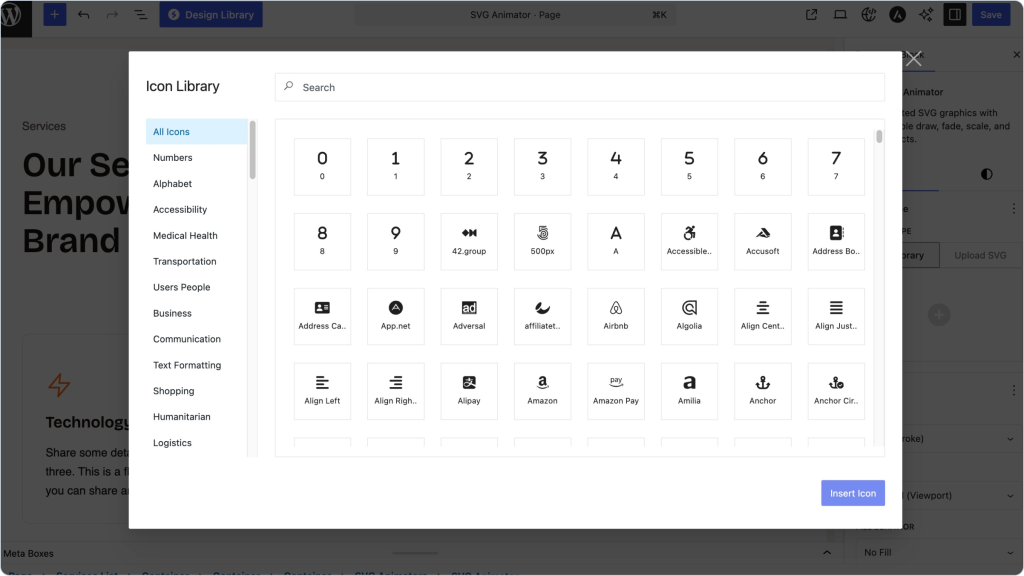
- Pick an SVG. Choose one from the icon library, or upload your own.
- Open the block settings on the right to set up the animation.
Choosing an SVG
You’ve got two options:
- Use a library icon. Browse 500+ ready-made icons, search by name or category, and add one with a single click.
- Upload your own. Drop in any SVG and the block figures out which paths and shapes can animate. Logos, illustrations, line art: it all works.
Animation Settings
This is where you choose what the animation does and when it happens.
Type
Four styles to pick from:
- Stroke (Draw). The lines draw themselves on screen, like someone sketching the icon live. Best for outline icons and line art.
- Scale. The icon pops in, growing from small to full size. Good for grabbing
- Fade. The icon eases in smoothly. Nice for backgrounds, watermarks, and decorative bits.
- Rotate. The icon spins, either once or continuously. Handy for loaders and gear icons.
Trigger
This decides when the animation starts. The default, On Scroll, plays it as the icon comes into view, which is great for revealing graphics as people scroll down the page.
| Tip: Add a small delay to a few icons and they’ll animate one after another instead of all at once.
Fill Behavior
Only shows up when you’re using Stroke (Draw). Fill After Stroke draws the outline first, then fills it in with color, giving you the classic “draw, then fill” look.
Timing & Playback
- Duration. How long the animation runs, in milliseconds. Higher feels slower and more deliberate; lower feels snappy. Default is 2000ms.
- Delay. How long to wait before it starts. Leave it at 0 to play right away, or bump it up to stagger a few icons.
- Easing. The feel of the motion. The default, Ease In Out, starts slow, speeds up in the middle, and slows down at the end. Smooth and natural.
Where You’d Use It
- Design. Animate your own illustrations and brand marks.
- Development. Bring custom SVGs and UI elements to life.
- Marketing. Add a little motion to hero graphics and banners.
- eCommerce. Liven up product badges and trust icons.
A Few Tips
- Match the style to the artwork. Use Stroke for outlines, Fade or Scale for solid shapes.
- Keep it subtle. Short durations and gentle easing usually look better than long, flashy motion.
- Don’t animate everything at once. Too much movement competes with your content.
- Clean up your SVGs before uploading so they animate cleanly.
Troubleshooting
Nothing’s animating: Make sure a Trigger is set. If you’re using On Scroll, check that the icon actually scrolls into view, and that the Delay isn’t set too high.
The Stroke effect isn’t showing: It works on icons with outlines or stroked paths. A solid filled shape may not show a visible draw.
My uploaded SVG won’t animate: Confirm it’s a valid SVG with animatable paths, then try re-uploading after cleaning out any unused or broken bits.
Frequently Asked Questions
Q: Do I need to know any code?
A: No. Pick an SVG, choose an animation, adjust the timing, and you’re done.
Q: Can I animate my own files?
A: Yes. Upload any SVG and the block detects what can animate.
Q: How many icons come with it?
A: Over 500, searchable by name and category.
Q: Will this slow my site down?
A: No. The animations are CSS-based with no JavaScript weight, so they stay easy on performance and SEO.
We don't respond to the article feedback, we use it to improve our support content.