
- Using Heading Block
- Buttons
- Post Grid
- Content Timeline
- Social Share
- Google Map
- Add Testimonials
- Info Box
- Section
- Team
- Icon List
- Price List
- Post Masonry
- Post Carousel
- Importing Starter Templates With Spectra
- Post Timeline
- Call To Action
- Advanced Columns
- Troubleshooting: Missing Icons
- Filters/Actions For Post
- Blockquote
- Spectra Patterns
- Contact Form 7: Multiple Column Fields
- Contact Form 7: Checkbox / Radio / Acceptance Control
- Unable To Style Contact Form 7
- Marketing Button
- Tab Index For Multiple Gravity Forms
- Getting Started With Spectra
- Manually Install Spectra Via FTP
- Table Of Contents
- How-to Schema
- FAQ’s: Schema/Accordion
- Inline Notice
- WP – Search
- Exclude Heading From TOC
- Review Schema
- Lottie
- Taxonomy List
- Tabs Block
- Block Display Conditions
- Create Contact Forms
- Import Single Pages, Templates, & Block Patterns
- Enable/Disable Design Library Button
- Update Folder File Permissions
- Assets API For Third-Party Plugins
- Star Rating
- Masonry Image Gallery
- Wireframe Blocks
- Copy & Paste Style
- Coming Soon Mode
- Load Google Fonts Locally
- Container Flex Property
- Default Content Width
- Blocks Editor Spacing
- Heading Block
- Image Block
- Buttons Block
- Translate Everything WPML
- Container Block
- Collapse Panels
- Responsive Conditions
- Taxonomy Styling Options
- Block Presets
- Image Gallery
- Counter Block
- Modal Block
- Registration Form Block
- Dynamic Content Extension
- Slider Block
- Pagel Level Custom CSS
- Countdown Pro
- Slider Custom Navigation
- Instagram Feed
- Loop Builder
- Animations
- Login Form Block
- Site Visibility
- Global Block Style Extension
- Spectra Actions: Clear Cache
- Create Popups
- Quick Action Bar
- Custom Blocks
- Move Block Patterns
- Grid Builder
- Move Title Bar To Top
- Resolving Container Layout Conflicts
- Newsletter Forms
- Register High-Privileged Users
- User Roles Access To AI
- Database Update Instructions (Below 2.0.0)
- FAQ's: VIP Priority Support
- Whitelist Email Address
- Hide Core Blocks
- Regenerate Assets With Code
- Using ACF Repeater Field in Spectra
- Pixabay Image Search Feature
- Getting Started with Instagram
- How to Fix Stretched Spectra Images in WordPress 6.7
- How to Change Breakpoints in Spectra?
- Controlling Access to the Spectra Design Library Based on User Roles
- Advanced Loop Builder
- Multi-Column Form Block Using Utility Classes
- Why Am I Seeing Mixed Content or Non-HTTPS Errors?
- Preview Options (Desktop, Tablet & Mobile)
- Transparent / Sticky Header
- Change Site Logo
- Change Global Styles
- Disable Title on Posts & Pages
- Transparent / Sticky Header For Single Page / Post
- Change Header & Footer Patterns
- Custom / Google Fonts
- Reset Global Default Styling
- Manually Install Spectra One Via FTP
- Enable / Disable Header & Footer On Specific Pages / Posts
Unable to Style Checkbox / Radio Buttons / Acceptance Control using Contact Form 7 Styler of Spectra
The Contact Form 7 Styler block of the Spectra allows you to style the radio buttons, checkboxes and acceptance too. Here is an article you can refer to.
In case you are unable to style them, here are a few things you need to check.
- Make sure that our checkbox/radio field has “use_label_element” tag in Contact Form 7 source code.
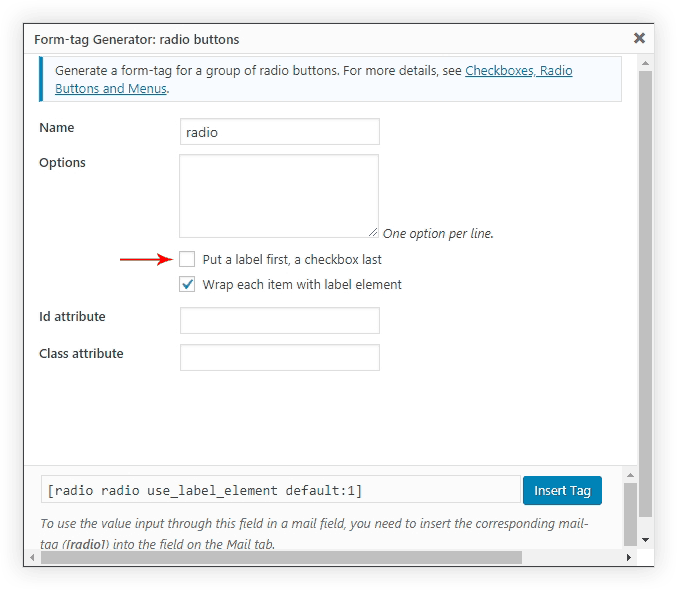
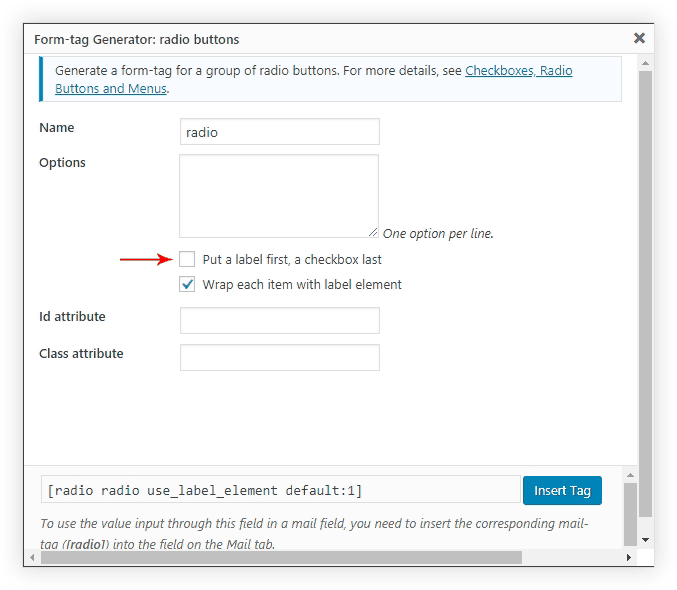
2. Please check that your checkbox / radio field should not have “label_first” tag in Contact Form 7 source code.
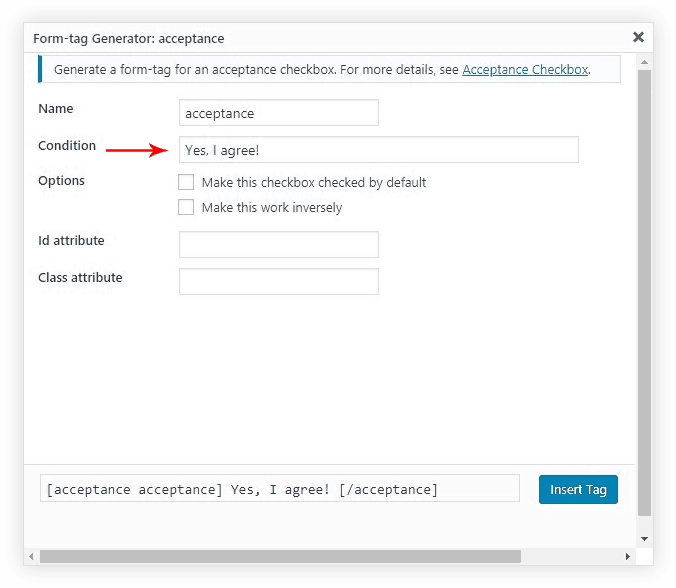
3. Please make sure your acceptance field has condition statement in Contact Form 7 source code
Was this doc helpful?
What went wrong?
We don't respond to the article feedback, we use it to improve our support content.