
- Filters/Actions For Post
- Spectra Patterns
- Contact Form 7: Checkbox / Radio / Acceptance Control
- Getting Started With Spectra
- WP – Search
- Create Contact Forms
- Import Single Pages, Templates, & Block Patterns
- Assets API For Third-Party Plugins
- Copy & Paste Style
- Load Google Fonts Locally
- Troubleshooting: Missing Icons
- Contact Form 7: Multiple Column Fields
- Unable To Style Contact Form 7
- Tab Index For Multiple Gravity Forms
- Manually Install Spectra Via FTP
- Enable/Disable Design Library Button
- Update Folder File Permissions
- Resolving Container Layout Conflicts
- Database Update Instructions (Below 2.0.0)
- Transparent / Sticky Header
- Change Site Logo
- Change Global Styles
- Disable Title on Posts & Pages
- Transparent / Sticky Header For Single Page / Post
- Change Header & Footer Patterns
- Custom / Google Fonts
- Reset Global Default Styling
- Manually Install Spectra One Via FTP
- Enable / Disable Header & Footer On Specific Pages / Posts
How Do License Upgrades Work?
If you already have a Spectra Pro license and want to move to a higher plan, you do not need to buy a new license from scratch. Upgrades let you pay only the difference between what you have paid and the price of the plan you want to move to. This keeps things fair and makes it easy to scale up as your needs grow.
Visit the upgrades page on our store to see all the upgrade options available to you based on your current plan.
Quick Links
- Lifetime to Lifetime Upgrades
- Annual to Lifetime Upgrades
- Annual to Annual Upgrades
- How to Upgrade
- What If There Is a Discount Offer?
Lifetime to Lifetime Upgrades
When you upgrade from one lifetime plan to another, you only pay the difference between the two plan prices. There is no need to pay the full price of the new plan.
For example, if you purchased Spectra Pro (3 Sites, Lifetime) at $319 and want to upgrade to the Essential Toolkit + AI (3 Sites, Lifetime) at $549, you only pay the difference between those two amounts.
Annual to Lifetime Upgrades
You can also upgrade from an annual plan to a lifetime plan and pay only the difference, as long as your annual license is still active at the time of the upgrade.
For example, if you are on Spectra Pro (3 Sites, Annual) at $69/year and want to move to Spectra Pro (3 Sites, Lifetime) at $319, you pay only the difference between those two prices.
Annual to Annual Upgrades
Upgrading between annual plans works a little differently. The cost you pay is based on both the price difference between the two plans and how much time is left on your current subscription. If your license has already expired, you will be charged the full annual price of the new plan.
Here is an example to make this clearer. Say you purchased Spectra Pro (3 Sites, Annual) on January 1, 2026, at $69. On July 1, 2026, halfway through your subscription, you decide to upgrade to Essential Toolkit + AI (10 Sites, Annual) at $199. The price difference is $130, and since 6 months remain in your subscription, you pay only half that difference. Your subscription then renews on January 1, 2027, at the higher plan’s full annual price, and your license remains active until January 1, 2028.
One important thing to note: the expiration date of your license does not change when you upgrade. An upgraded annual license will still expire on the original renewal date, whether you paid a prorated amount or the full price.
How to Upgrade
Just visit the upgrades page on our store. You will see all the upgrade options available to you based on your current plan, along with the amount you need to pay.
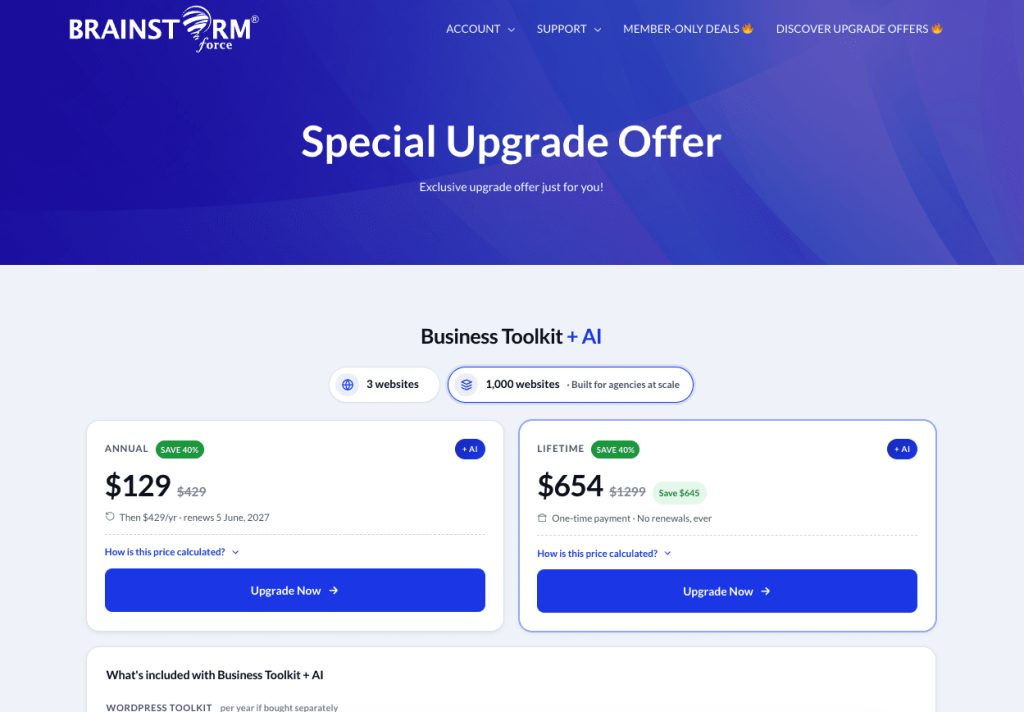
What If There Is a Discount Offer?
If a discount is running at the time of your upgrade, it will be applied to the difference amount you owe, not to the full plan price.
For example, say there is a 20% discount on upgrades, and you are on Spectra Pro (3 Sites, Lifetime) at $319, and you want to upgrade to the Essential Toolkit + AI (3 Sites, Lifetime) at $549. The difference between the two plans is $230, and the 20% discount is applied to that difference, reducing what you actually pay.
Frequently Asked Questions
We hope this cleared up how upgrades work for Spectra Pro. If you have any questions or run into anything unexpected during your upgrade, feel free to reach out to our support team, and we will be happy to help.
We don't respond to the article feedback, we use it to improve our support content.