
Since we introduced Spectra Blocks, we’ve heard from some of you wondering what the rename to Spectra Legacy actually means for the sites you’ve already built. It’s a reasonable question. Spectra Legacy could sound like a plugin on its way out, so we want to walk through exactly why we made this choice and what it means for you.
Let’s go through it, one piece at a time.
Why are there two Spectra plugins now?
Spectra launched nine years ago as one of the first block based page builders for WordPress. Since then, the block editor itself has changed a lot, new APIs, new patterns, a different foundation than what existed when Spectra started. Spectra Blocks is built entirely on that modern foundation.
That’s also the answer to the obvious question: why not just update the plugin you already have? A rewrite on this scale isn’t something we could do quietly in the background.
If we had rebuilt Spectra Blocks inside Spectra Legacy, every existing site would have been exposed to a ground up rewrite of the plugin powering it, whether that site’s owner asked for it or not. New foundations, new markup, new settings, all landing on your live site on our timeline.
Building Spectra Blocks as a separate plugin means that never happens. Your site keeps working exactly as it does today, and it only changes if and when you choose to install something new. The separation wasn’t the easier path for us. It was the one that kept your site out of our hands.
What do you need to do? Nothing
There is no deadline to migrate from Spectra Legacy to Spectra Blocks, and no forced path that ends with your site being switched over automatically.
Spectra Legacy will continue to receive bug fixes, security updates, and full support for as long as you’re using it. Nothing about your current site, its blocks, its settings, or its behavior changes unless you decide to change it yourself.
If you want to try Spectra Blocks on a new page or a new site, you can. If you’d rather stay exactly where you are, you can do that too, indefinitely.
For agency owners: The white-label option
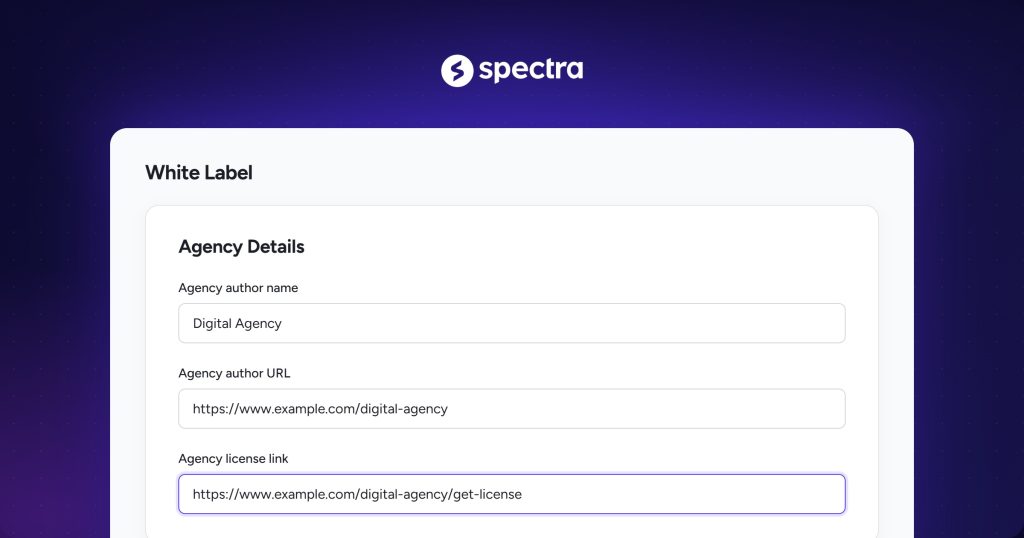
If you build sites for clients, we know legacy branding might not be what you want your clients to see in their dashboard, even though nothing about the plugin itself has changed.
That’s why Spectra Legacy Pro now includes a white-label option, so you can rename the plugin however you’d like in your clients’ dashboards. What your clients see is entirely up to you.
What Spectra Blocks brings to the table
None of this means Spectra Blocks isn’t worth your attention. It’s built from the ground up on the latest Gutenberg APIs, with the ability to let you connect your own AI agent and optimize existing page-building workflows:
- Describe a page, get a first draft: Connect your own AI agent and describe a page in plain language. It can generate a complete page using real, fully editable Spectra blocks. No proprietary layout system, no separate builder to learn.
- Generate just a section: Need a pricing table, an FAQ, or a hero section instead of a whole page? Ask for exactly that piece and drop it in.
- Global Styles, set up for you: When you build with AI, your colors, typography, and spacing get set up as Global Styles automatically, and carry through every block on every page from there.
- You still make the calls: AI gets you a strong starting point, not a final answer. Every layout, section, and line of copy is yours to edit afterward, the same way you’d edit anything else in the block editor.
- Cleaner output: Fewer wrapper elements, smaller DOM, faster loading, markup search engines read more clearly.
- A more native feel: Settings panels that work like the rest of the WordPress editor, not a bolted-on system.
- Consistent blocks: Every block follows the same layout and logic, so learning one means understanding the rest.
- Built for what’s next: Aligned with where WordPress itself is heading, so it stays in step with the platform.
If any of that sounds useful to you, it’s there whenever you’re ready. If you’d rather build by hand, that’s fine too, which brings us to the next point.
Licensing: nothing extra to pay
If you want to explore Spectra Blocks, there’s no additional cost to do so. Spectra Legacy Pro customers already get both a Legacy Pro license and a Blocks Pro license, at no added charge. There’s nothing to upgrade and nothing new to buy.
Spectra Legacy or Blocks: Which one is for you
Both plugins are fully supported, and neither one is the “correct” choice for everybody. Here’s a straightforward look at how they differ, so you can decide for yourself.
| Consideration | Spectra Legacy | Spectra Blocks |
|---|---|---|
| Best suited for | Existing sites already built and running well | New sites, or anyone who wants the latest architecture from day one |
| Block architecture | Established, purpose-built blocks | Composable blocks built on native Gutenberg APIs |
| Editor experience | Familiar, unchanged from what you know today | Designed to match the native WordPress editor experience |
| Migration required | None. Continue exactly as you are | Optional, install fresh whenever you’re ready |
| Support status | Fully supported | Fully supported |
If you’re maintaining a site that’s working well for you, there’s a strong case for staying right where you are.
If you’re starting something new, Spectra Blocks is where we’d point you, simply because it’s where the newest capabilities will keep showing up first.
The bottom line
Splitting Spectra into two plugins was a decision made to protect the sites you’ve already built, not a way of moving on from them. Spectra Legacy isn’t going anywhere, and it isn’t getting any less of our attention. Spectra Blocks is simply there for whenever, or if, you want it.
Both plugins are fully supported. The choice, and the timeline, are entirely yours.
If you have questions about the transition, our support team is happy to help.
Frequently asked questions
Will my existing site break when Spectra Blocks is released?
No. Your site continues to work exactly as it does today. Spectra Legacy is fully supported, and nothing about it changes unless you choose to change it.
Do I have to migrate my site to Spectra Blocks?
No. Migration is optional and entirely on your own timeline. There’s no deadline and no pressure to switch.
Why does Spectra Blocks have fewer blocks than Spectra Legacy?
Spectra Blocks focuses on the blocks that cover the widest range of real use cases, and its composable design lets you combine a smaller set of blocks to build the same layouts. We’re also growing the library of ready made patterns, so common layouts are just one click away.
Why do the settings look different in Spectra Blocks?
The settings in Spectra Blocks are designed to match the native WordPress editor and stay consistent across every block. If you’re used to Spectra Legacy, there’s a short adjustment period, but most people find the new layout faster to work with after a day or two.
I run an agency. Will my clients see “Legacy” branding in their dashboard?
Only if you want them to. Spectra Legacy Pro includes a white-label option that lets you rename the plugin as you see fit, so client-facing branding is entirely your call.
I’m a Spectra Legacy Pro customer. Do I need to pay anything for Spectra Blocks?
No. Your current license covers both Spectra Legacy Pro and Spectra Blocks Pro. There’s nothing extra to buy and nothing to upgrade.
Will Spectra Legacy keep receiving updates?
Yes. Spectra Legacy will continue to receive support and maintenance.
Does Spectra Blocks require AI to use it?
No. AI is an optional way to build faster, connect your own AI agent and describe a page to get real, editable blocks. You can build everything by hand instead if you’d rather, the same way you always have
Disclosure: This blog may contain affiliate links. If you make a purchase through one of these links, we may receive a small commission. Read disclosure. Rest assured that we only recommend products that we have personally used and believe will add value to our readers. Thanks for your support!

Recommended Articles
Introducing Advanced Columns with Shape Dividers
Complete Website Demos For Gutenberg!